works
Selected works
Musee
Common Café
Visual works
Gong Xu Design
GP Project 2050
hello-penny.com

Musee
A workspace that helps creatives transform scattered inspiration into structured, searchable, and reusable design knowledge — enhanced by AI assistance.
AI assistance
0 → 1
Cross-device
Semantic Search
End-to-End
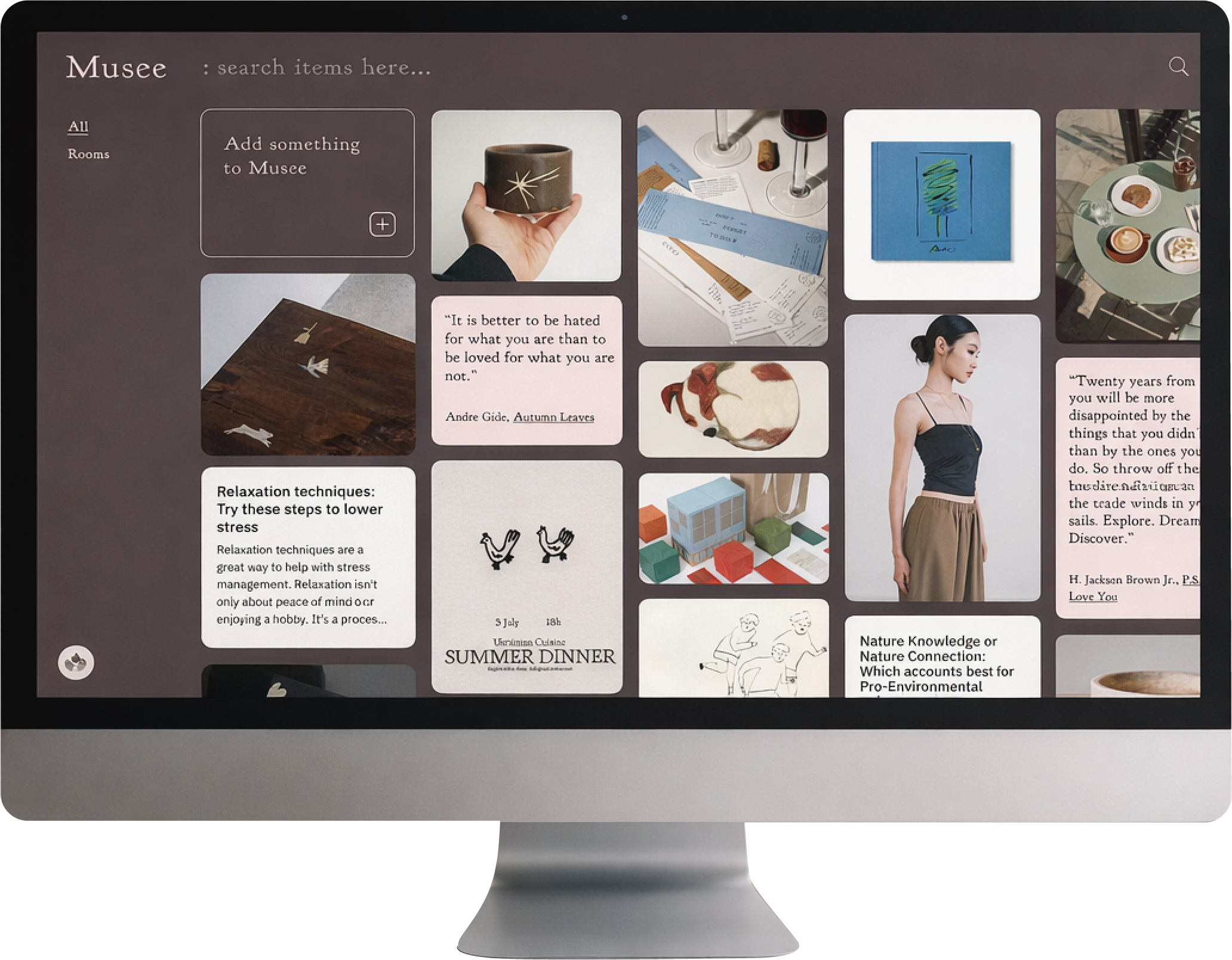
Musee: An AI-Driven Ecosystem for Seamless Creative Workflow
A multi-format, cross-device tool that turns scattered discoveries into structured, searchable, and usable creative assets.

Efficiency Boost: Collecting in seconds.

Auto-organize with AI.

Find anything by meaning — not keywords
Time
Aug 2025 → Jan 2026
Side project · 0 → 1Built and iterated based on real creative workflows
Role
Product Designer (UX Research · UI · Interaction)
Team
Solo designer

Beyond Collection: Solving the Disconnect
Between Discovery and Application
Today, we don’t lack inspiration or information — we lack a way to apply what we discover.
Ideas are captured across devices, moments, and formats, then scattered and rarely reused. The real problem isn’t collecting inspiration, but recalling and applying it when needed.
01
Fragmented Capture
Inspiration is captured across contexts and devices.
02
Multi-format Inputs
Ideas come as images, links, text, screenshots—not a single format.
03
Meaning-based Recall
People remember by mood and context, not exact keywords.

How might we
turn scattered, multi-format inspirations into organized, searchable, and reusable ideas — without adding organizational burden?
Combining Empathy with Journey Mapping to Identify Where Inspiration Fails to Become Action
Persona

Alex (28)
Creative Professional
“ I know I saved it somewhere,
but I can’t find it anymore.”
Behavior Snapshot

Cross-platform inspiration collector
Remembers visuals & intent, not locations
Two primary capture modes:

Desktop: intentional, project-driven research
Mobile: spontaneous, casual browsing

Goals
Capture inspiration instantly
Find content by visual memory & intent
Challenges
Inspiration scattered across tools
Search doesn’t match how memory works
Customer journey map
🧭 Stages
Discover
Save
Recall
Organize
Apply
💭 Thinking
“This looks interesting, I might need this someday.”
“I’ll save it later.”
“Where should I save this?”
“Screenshot first, I’ll organize later.”
“I remember how it looked… but not where I saved it.”
“What keyword should I even search?”
“I should clean this up someday.”
This is going to take too much effort.”
“I know I had references for this…”
“It’s faster to just find new ones.”
⚡ Doing
Casual browsing on mobile (IG, Pinterest, blogs)
Intentional search on desktop for project references
Takes screenshots
Uses IG Saves, bookmarks, notes, chat apps
Tries keyword search
Scrolls through old saves or folders
Occasionally creates folders or tags
Often postpones organization
Re-searches instead of reusing saved content
Leaves old collections untouched
🌊 Feeling
🙂
Curious,
slightly overwhelmed
😐
Neutral, slight friction
😣
Frustrated,
discouraged
😩
Overwhelmed,
avoidant
😕
Disappointed, Indifferent
🧩 Pain Points
Inspiration appears across different contexts and devices
Saving feels interruptive or friction-heavy
Often delays saving or saves “somewhere first”
Inspirations are scattered across multiple tools
Different formats require different saving behaviors
No single place accepts everything
Memory is visual and contextual, not keyword-based
Search fails without exact words or platforms
Older inspirations become effectively “lost”
Manual organization is mentally taxing
Mixed content types don’t live well together
Saved inspirations rarely resurface during real work
Re-finding effort outweighs perceived value
Collections become passive archives
✨ Opportunities

Reduce capture friction across devices
Make saving feel instant and low-effort
Unify fragmented content into one consistent system
Support all formats without changing user habits
Enable recall by meaning, mood, or intent
Reduce dependence on exact keywords
Lower the cost of organization
Let structure emerge naturally over time
Resurface inspiration at the right moment
Turn saved content into reusable creative assets
Why Inspiration Breaks — and How We Designed Around It
Rather than treating individual pain points in isolation, the research revealed several underlying patterns that directly shaped Musee’s design decisions.
01
Inspiration isn’t scarce—application is.
Creators struggle to move from discovery to use.
02
Collection outpaces organization.
Systems that rely on discipline and manual sorting don’t scale.
03
Recall is meaning-based, not keyword-based.
People remember mood, visuals, and intent—not exact terms.
04
Inspiration spans contexts, memory does not.
Cross-device and cross-moment discoveries fragment recall.
05
If it can’t be retrieved, it can’t be reused.
Lost access turns inspiration into passive storage.
Navigating Design Trade-offs
Exploring Multiple Paths to Balance Intelligence with Control
In developing Musee’s search experience, I benchmarked leading inspiration tools and prototyped multiple explorations to refine the user’s mental model.
01. Search: Intent over Complexity
Initially, I explored advanced filters for precision. However, forcing users to "plan" their search beforehand significantly increased cognitive load.
The Decision: I shifted to a semantic, intent-based input. AI interprets what users mean, making search feel like a natural conversation rather than a database query.
02. AI Boundaries: Strategic Control
I debated automating all categorization via AI. Through engineering alignment, I found that maintaining explicit structures reduces system latency and provides a more predictable mental model.
The Decision: I leveraged AI to "understand intent" rather than replacing all structural choices. This ensures a balance between system intelligence and user autonomy.
03. Wayfinding: Subtle Contextual Clues
Early versions lacked navigation, causing users to feel lost during deep browsing. I experimented with prominent placements, but they cluttered the interface and disrupted the creative flow.
The Decision: I introduced low-interference breadcrumbs as a "contextual safety net". This allows for seamless backtracking without breaking the visual rhythm.
The Solution,
From Capture to Recall — Designing for Reuse
Musee is designed as an end-to-end, multi-format inspiration system —
supporting images, articles, links, quotes, and references within a single workflow.
Inspiration appears
Auto-curation by AI
Organize into Room / Space
Semantic Search

Capture inspiration

Apply inspiration in real project work


Apply inspiration in real project work
User action
Save instantly—no organization decisions required.
System capabilities enabled after capture
AI curates content for structured or memory-based access.
User Flow (System-driven)
Capture activates system intelligence rather than manual organization. Saved inspiration is automatically structured and accessible via Rooms, Spaces, or semantic recall.
Simplified End-to-End Flow
Musee shifts the burden of organization from users to the system. After capture, inspiration is automatically structured and re-engaged through either project-based organization or semantic recall—leading to real-world application.
From Insight to Implementation
01
Make capturing effortless — in any context(P1)
Musee is designed as an end-to-end inspiration system, turning scattered discoveries into reusable creative assets.
Supports mixed formats including images, links, articles, quotes, screenshots, and social posts
Unified capture via desktop extension and mobile share
02
Reduce cognitive load with AI auto-curation(P1)
Instead of requiring upfront organization, Musee automatically structures inspiration at the moment of capture.
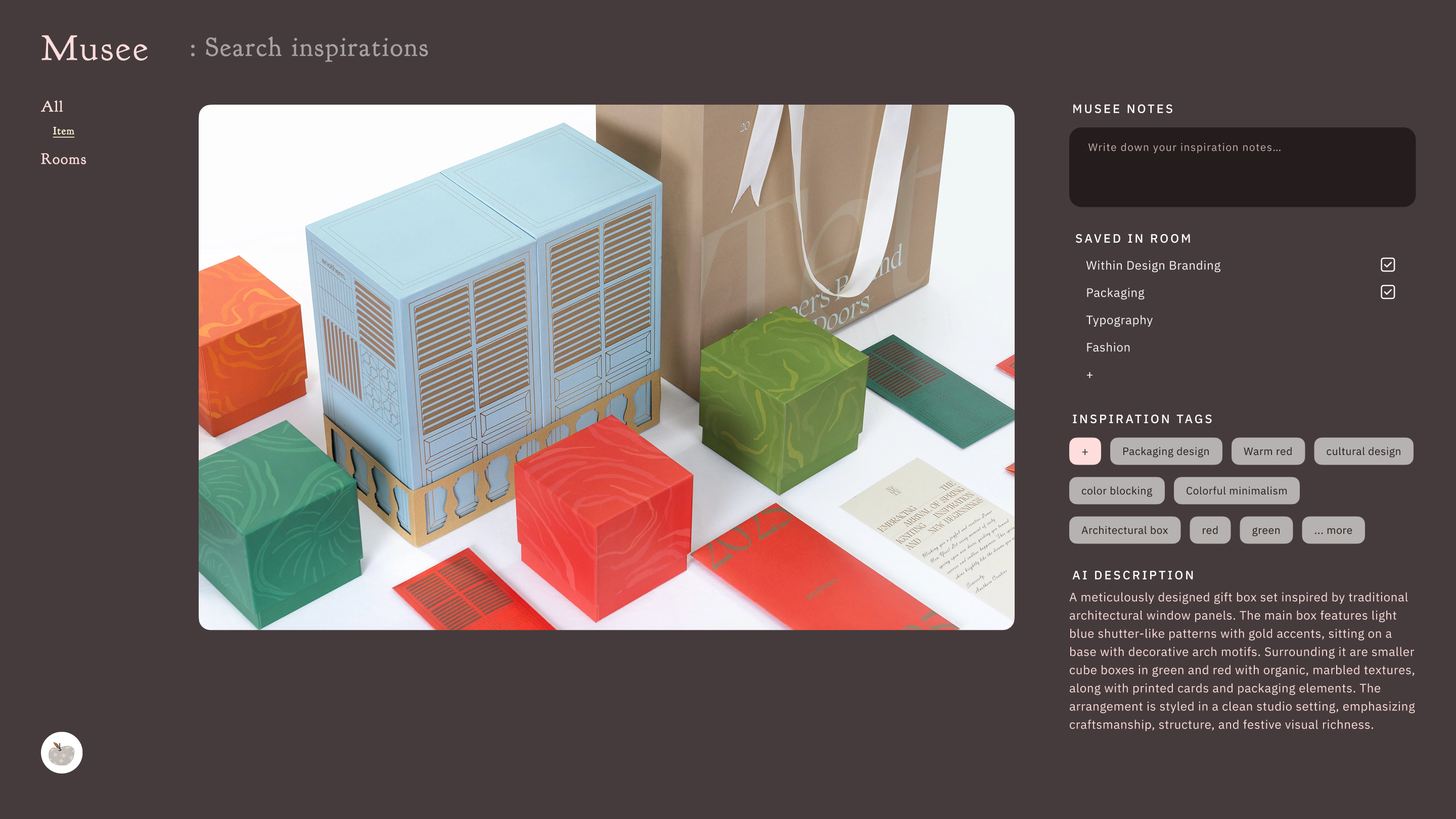
AI-generated tags, descriptions
Consistent behavior across all content types
03
Support project-based thinking with flexible structure(P1,P2)
Musee mirrors how creators think about work — thematically rather than hierarchically.
Rooms for projects
Spaces for sub-themes (e.g. color, tone, layout)
Mixed-format content lives naturally within the same structure
04
Semantic Search — enable recall by meaning(P1)
Musee enables rediscovery even when users can’t remember where content came from or how it was saved.By combining semantic intent with format-based filtering, users can search across visual and text-based inspiration—retrieving articles, quotes, or visuals by meaning while refining results by content type.
Search by mood, style, concept, or visual intent
Semantic and category-based filters work together to support vague recall, rather than relying on exact keywords
05
Time-aware inspiration reminders(P2)
After semantic recall is established, Musee introduces time as a gentle signal for rediscovery — not as a productivity or cleanup mechanism. Instead of letting inspiration fade silently, Musee surfaces saved items at the right moment, without pressure.
Shows how long inspirations have been saved (e.g. 30 days, 100 days)
Time prompts act as soft revisit cues, not forced organization tasks
From Principles to Interface
High-fidelity UI screens include:
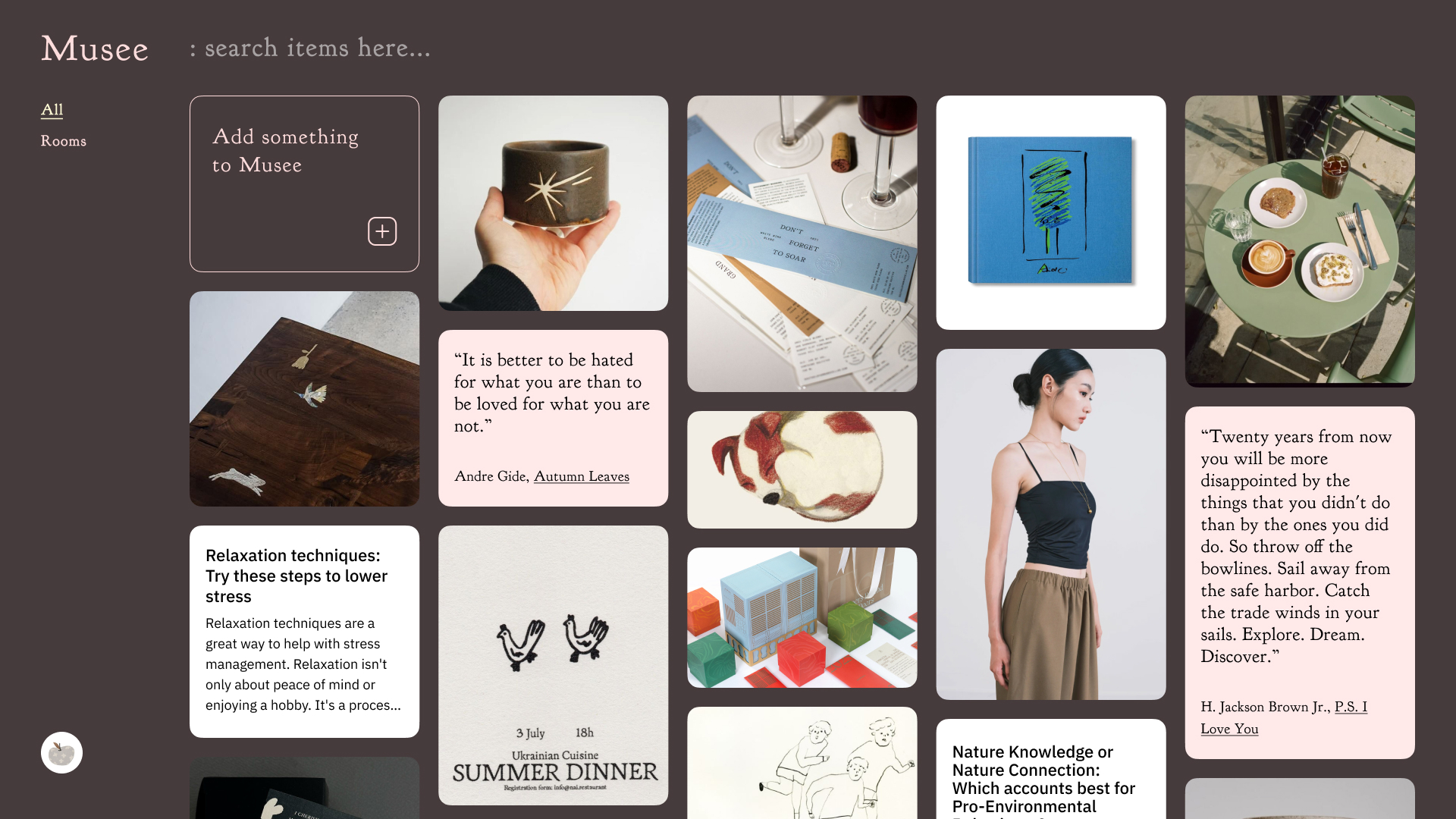
Home / Inspirations
A unified home for capturing and browsing mixed-format inspiration.
Setting / dark and light mode
Supports both dark and light themes for different working environments.
Search · Preview before committing
Users can long-press to preview articles on mobile, reducing page jumps and the mental cost of deciding what to open.
Item detail (image / article / link)
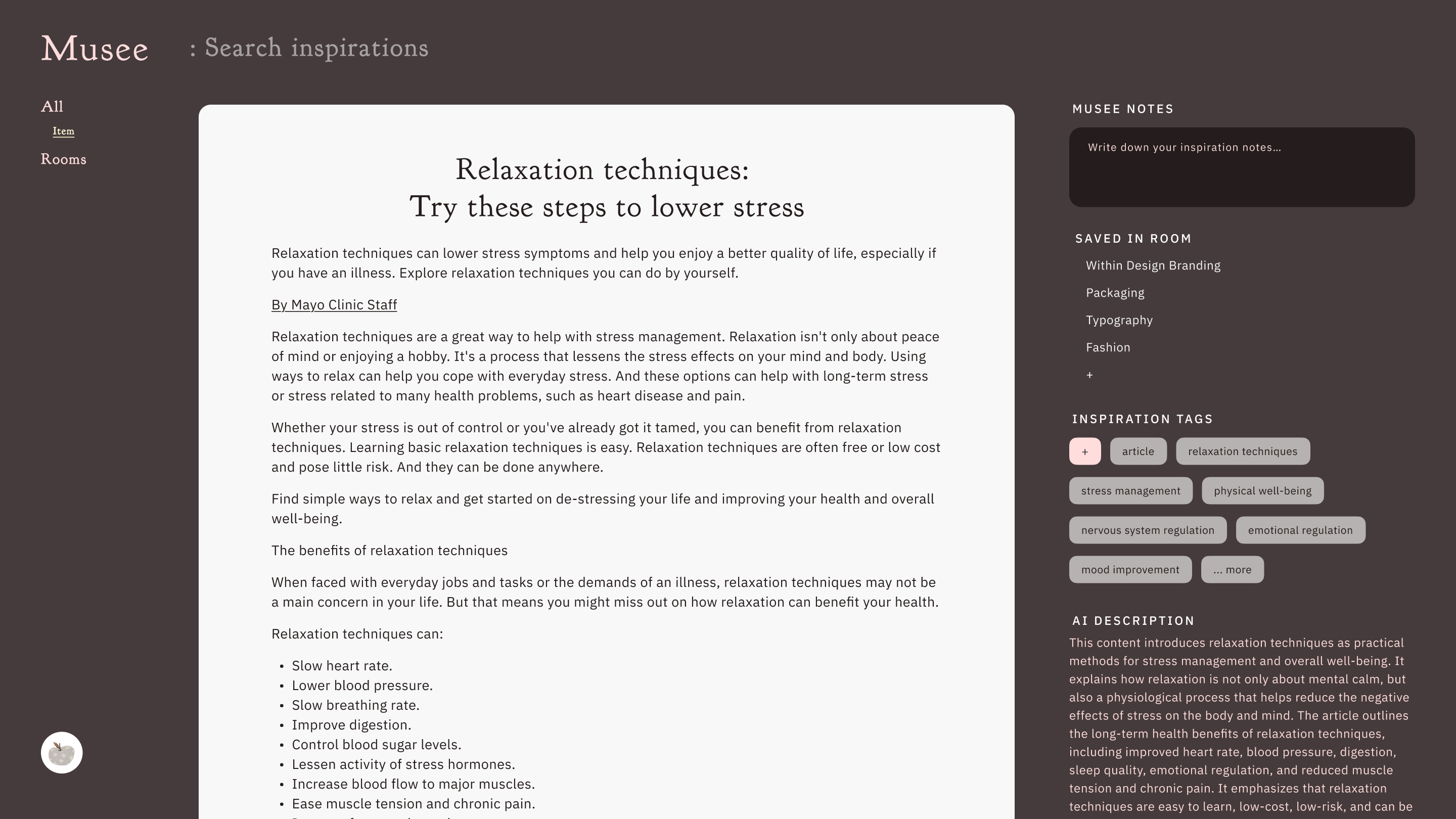
Regardless of format, each item shares a consistent detail structure — combining visual content, AI-generated metadata, and contextual notes for reuse across projects.
Impact Validated
(From Usability Testing)
Scores reflect post-task ratings after completing core workflows.
Participants: 5 creative professionalsMethod: Remote task-based testing · High-fidelity prototypeScale: 1 (Strongly disagree) – 5 (Strongly agree)

Faster capture (2.2→4.6 / 5)
Users saved inspiration across devices without pausing to organize.

Higher reuse (3.6→4.6 / 5)
AI-generated metadata resurfaced forgotten inspiration during new tasks.

More reliable rediscovery
(2.8→4.4 / 5)
Semantic search enabled recall by mood or intent, not keywords.

Lower organization overhead
(3.6→4.4 / 5)
Removing upfront structure reduced mental effort.
Defining the MVP: Focus Before Features
Validate semantic recall before expanding features.
P1 — MVP (Core Value Validation)
Question: Can semantic search reduce the cost of reuse?
Multi-format saving
AI-generated tags and descriptions
Semantic search
Rooms (project-level organization)
Mobile share → Musee
P2 — Post-MVP
Expand structure and long-term reuse.
Sub-themes (Spaces)
Screenshot import
Time-aware inspiration reminders
Out of scope (for MVP)
Deferred by design
Highlighting & recaps
Reflection / cleanup flows
Potential paid feature
Collaboration with teammates
Moodboards & layout
Video and PDF support
Reflection & Next Steps
Key learnings
The value of inspiration tools lies in retrieval, not storage.
AI is most effective when it reduces cognitive load without replacing user intent.
Cross-device continuity is foundational, not optional.
Validating technical feasibility and platform constraints with engineers earlier would help anticipate implications around content sourcing, storage cost, and compliance.
Trade-offs & next steps
Earlier validation of semantic search feasibility would improve MVP scoping and technical alignment.
Deeper metadata extraction (visual style, tone, intent) could further improve recall quality.
Future directions include richer formats (PDF, video) and collaborative workflows, with consideration for storage cost and monetization trade-offs.
View Project: Common Café
Open to product design & UX opportunitiesmeetmix@gmail.com


© 2025 Pei Rong Penny Jiang
selected works
Musee
Common Café
visual works
GP Project 2050
Gong Xu Design
hello-penny.com
Musee
A workspace that helps creatives transform scattered inspiration into structured, searchable, and reusable design knowledge — enhanced by AI assistance.
AI assistance
0 → 1
Cross-device
Semantic Search
End-to-End
Musee: An AI-Driven Ecosystem for Seamless Creative Workflow
A multi-format, cross-device tool that turns scattered discoveries into structured, searchable, and usable creative assets.

Efficiency Boost: Collecting in seconds.

Auto-organize with AI.

Find anything by meaning — not keywords
Time
Aug 2025 → Jan 2026
Side project · 0 → 1Built and iterated based on real creative workflows
Role
Product Designer (UX Research · UI · Interaction)
Team
Solo designer

Beyond Collection: Solving the Disconnect
Between Discovery and Application
Today, we don’t lack inspiration or information — we lack a way to apply what we discover.
Ideas are captured across devices, moments, and formats, then scattered and rarely reused. The real problem isn’t collecting inspiration, but recalling and applying it when needed.
01
Fragmented Capture
Inspiration is captured across contexts and devices.
02
Multi-format Inputs
Ideas come as images, links, text, screenshots—not a single format.
03
Meaning-based Recall
People remember by mood and context, not exact keywords.

How might we
turn scattered, multi-format inspirations into organized, searchable,
and reusable ideas — without adding organizational burden?
Combining Empathy with Journey Mapping to Identify Where Inspiration Fails to Become Action
Persona

Alex (28)
Creative Professional
“ I know I saved it somewhere,
but I can’t find it anymore.”

Behavior Snapshot
Cross-platform inspiration collector
Remembers visuals & intent, not locations
Two primary capture modes:
Desktop: intentional, project-driven research
Mobile: spontaneous, casual browsing

Goals
Capture inspiration instantly
Find content by visual memory & intent

Challenges
Inspiration scattered across tools
Search doesn’t match how memory works
Customer journey map
🧭 Stages
Discover
Save
Recall
Organize
Apply
💭 Thinking
“This looks interesting, I might need this someday.”
“I’ll save it later.”
“Where should I save this?”
“Screenshot first, I’ll organize later.”
“I remember how it looked… but not where I saved it.”
“What keyword should I even search?”
“I should clean this up someday.”
This is going to take too much effort.”
“I know I had references for this…”
“It’s faster to just find new ones.”
⚡ Doing
Casual browsing on mobile (IG, Pinterest, blogs)
Intentional search on desktop for project references
Takes screenshots
Uses IG Saves, bookmarks, notes, chat apps
Tries keyword search
Scrolls through old saves or folders
Occasionally creates folders or tags
Often postpones organization
Re-searches instead of reusing saved content
Leaves old collections untouched
🌊 Feeling
🙂
Curious,
slightly overwhelmed
😐
Neutral, slight friction
😣
Frustrated,
discouraged
😩
Overwhelmed,
avoidant
😕
Disappointed, Indifferent
🧩 Pain Points
Inspiration appears across different contexts and devices
Saving feels interruptive or friction-heavy
Often delays saving or saves “somewhere first”
Inspirations are scattered across multiple tools
Different formats require different saving behaviors
No single place accepts everything
Memory is visual and contextual, not keyword-based
Search fails without exact words or platforms
Older inspirations become effectively “lost”
Manual organization is mentally taxing
Mixed content types don’t live well together
Saved inspirations rarely resurface during real work
Re-finding effort outweighs perceived value
Collections become passive archives
✨ Opportunities
Reduce capture friction across devices
Make saving feel instant and low-effort
Unify fragmented content into one consistent system
Support all formats without changing user habits
Enable recall by meaning, mood, or intent
Reduce dependence on exact keywords
Lower the cost of organization
Let structure emerge naturally over time
Resurface inspiration at the right moment
Turn saved content into reusable creative assets
Why Inspiration Breaks —
and How We Designed Around It
Rather than treating individual pain points in isolation, the research revealed several underlying patterns that directly shaped Musee’s design decisions.
01
Inspiration isn’t scarce—application is.
Creators struggle to move from discovery to use.
02
Collection outpaces organization.
Systems that rely on discipline and manual sorting don’t scale.
03
Recall is meaning-based, not keyword-based.
People remember mood, visuals, and intent—not exact terms.
04
Inspiration spans contexts, memory does not.
Cross-device and cross-moment discoveries fragment recall.
05
If it can’t be retrieved, it can’t be reused.
Lost access turns inspiration into passive storage.
Navigating Design Trade-offs
Exploring Multiple Paths to Balance Intelligence with Control
In developing Musee’s search experience, I benchmarked leading inspiration tools and prototyped multiple explorations to refine the user’s mental model.
01. Search: Intent over Complexity
Initially, I explored advanced filters for precision. However, forcing users to "plan" their search beforehand significantly increased cognitive load.
The Decision: I shifted to a semantic, intent-based input. AI interprets what users mean, making search feel like a natural conversation rather than a database query.
02. AI Boundaries: Strategic Control
I debated automating all categorization via AI. Through engineering alignment, I found that maintaining explicit structures reduces system latency and provides a more predictable mental model.
The Decision: I leveraged AI to "understand intent" rather than replacing all structural choices. This ensures a balance between system intelligence and user autonomy.
03. Wayfinding: Subtle Contextual Clues
Early versions lacked navigation, causing users to feel lost during deep browsing. I experimented with prominent placements, but they cluttered the interface and disrupted the creative flow.
The Decision: I introduced low-interference breadcrumbs as a "contextual safety net". This allows for seamless backtracking without breaking the visual rhythm.
The Solution,
From Capture to Recall — Designing for Reuse
Musee is designed as an end-to-end, multi-format inspiration system —
supporting images, articles, links, quotes, and references within a single workflow.
Inspiration appears
Auto-curation by AI
Organize into Room / Space
Semantic Search
Capture inspiration
Apply inspiration in real project work

Apply inspiration in real project work
User action
Save instantly—no organization decisions required.
System capabilities enabled after capture
AI curates content for structured or memory-based access.
User Flow (System-driven)
Capture activates system intelligence rather than manual organization. Saved inspiration is automatically structured and accessible via Rooms, Spaces, or semantic recall.
Simplified End-to-End Flow
Musee shifts the burden of organization from users to the system. After capture, inspiration is automatically structured and re-engaged through either project-based organization or semantic recall—leading to real-world application.
From Insight to Implementation
01
Make capturing effortless — in any context(P1)
Musee is designed as an end-to-end inspiration system, turning scattered discoveries into reusable creative assets.
Supports mixed formats including images, links, articles, quotes, screenshots, and social posts
Unified capture via desktop extension and mobile share
02
Reduce cognitive load with AI auto-curation(P1)
Instead of requiring upfront organization, Musee automatically structures inspiration at the moment of capture.
AI-generated tags, descriptions
Consistent behavior across all content types
03
Support project-based thinking with flexible structure(P1,P2)
Musee mirrors how creators think about work — thematically rather than hierarchically.
Rooms for projects
Spaces for sub-themes (e.g. color, tone, layout)
Mixed-format content lives naturally within the same structure
04
Semantic Search — enable recall by meaning(P1)
Musee enables rediscovery even when users can’t remember where content came from or how it was saved.By combining semantic intent with format-based filtering, users can search across visual and text-based inspiration—retrieving articles, quotes, or visuals by meaning while refining results by content type.
Search by mood, style, concept, or visual intent
Semantic and category-based filters work together to support vague recall, rather than relying on exact keywords
05
Time-aware inspiration reminders(P2)
After semantic recall is established, Musee introduces time as a gentle signal for rediscovery — not as a productivity or cleanup mechanism. Instead of letting inspiration fade silently, Musee surfaces saved items at the right moment, without pressure.
Shows how long inspirations have been saved (e.g. 30 days, 100 days)
Time prompts act as soft revisit cues, not forced organization tasks
From Principles to Interface
High-fidelity UI screens include:
Home / Inspirations
A unified home for capturing and browsing mixed-format inspiration.
Setting / dark and light mode
Supports both dark and light themes for different working environments.
Search · Preview before committing
Users can long-press to preview articles on mobile, reducing page jumps and the mental cost of deciding what to open.
Item detail (image / article / link)
Regardless of format, each item shares a consistent detail structure — combining visual content, AI-generated metadata, and contextual notes for reuse across projects.
Impact Validated (From Usability Testing)
Scores reflect post-task ratings after completing core workflows.
Participants: 5 creative professionalsMethod: Remote task-based testing · High-fidelity prototypeScale: 1 (Strongly disagree) – 5 (Strongly agree)

Faster capture (2.2→4.6 / 5)
Users saved inspiration across devices without pausing to organize.

Higher reuse (3.6→4.6 / 5)
AI-generated metadata resurfaced forgotten inspiration during new tasks.

More reliable rediscovery (2.8→4.4 / 5)
Semantic search enabled recall by mood or intent, not keywords.

Lower organization overhead (3.6→4.4 / 5)
Removing upfront structure reduced mental effort.
Defining the MVP: Focus Before Features
Validate semantic recall before expanding features.
P1 — MVP (Core Value Validation)
Question: Can semantic search reduce the cost of reuse?
Multi-format saving
AI-generated tags and descriptions
Semantic search
Rooms (project-level organization)
Mobile share → Musee
P2 — Post-MVP
Expand structure and long-term reuse.
Sub-themes (Spaces)
Screenshot import
Time-aware inspiration reminders
Out of scope (for MVP)
Deferred by design
Highlighting & recaps
Reflection / cleanup flows
Potential paid feature
Collaboration with teammates
Moodboards & layout
Video and PDF support
Reflection & Next Steps
Key learnings
The value of inspiration tools lies in retrieval, not storage.
AI is most effective when it reduces cognitive load without replacing user intent.
Cross-device continuity is foundational, not optional.
Validating technical feasibility and platform constraints with engineers earlier would help anticipate implications around content sourcing, storage cost, and compliance.
Trade-offs & next steps
Earlier validation of semantic search feasibility would improve MVP scoping and technical alignment.
Deeper metadata extraction (visual style, tone, intent) could further improve recall quality.
Future directions include richer formats (PDF, video) and collaborative workflows, with consideration for storage cost and monetization trade-offs.
View Project: Common Café
Open to product design & UX opportunitiesmeetmix@gmail.com
© 2025 Pei Rong Penny Jiang
Selected works
Musee
Common Café
Visual Works
GP Project 2050
Gong Xu Design
hello-penny.com
Musee
A workspace that helps creatives transform scattered inspiration into structured, searchable, and reusable design knowledge — enhanced by AI assistance.
AI assistance
0 → 1
Cross-device
Semantic Search
End-to-End
Musee: An AI-Driven Ecosystem for Seamless Creative Workflow
A multi-format, cross-device tool that turns scattered discoveries into structured, searchable, and usable creative assets.
Efficiency Boost: Collecting in seconds.
Auto-organize with AI.
Find anything by meaning — not keywords

Time
Aug 2025 → Jan 2026
Side project · 0 → 1Built and iterated based on real creative workflows
Role
Product Designer (UX Research · UI · Interaction)
Team
Solo designer
Beyond Collection: Solving the Disconnect
Between Discovery and Application
Today, we don’t lack inspiration or information — we lack a way to apply what we discover.
Ideas are captured across devices, moments, and formats, then scattered and rarely reused. The real problem isn’t collecting inspiration, but recalling and applying it when needed.
01
Fragmented Capture
Inspiration is captured across contexts and devices.
02
Multi-format Inputs
Ideas come as images, links, text, screenshots—not a single format.
03
Meaning-based Recall
People remember by mood and context, not exact keywords.

How might we
turn scattered, multi-format inspirations into organized, searchable,
and reusable ideas — without adding organizational burden?
Combining Empathy with Journey Mapping to Identify Where Inspiration Fails to Become Action
Persona

Alex (28)
Creative Professional
“ I know I saved it somewhere,
but I can’t find it anymore.”

Behavior Snapshot
Cross-platform inspiration collector
Remembers visuals & intent, not locations
Two primary capture modes:
Desktop: intentional, project-driven research
Mobile: spontaneous, casual browsing

Goals
Capture inspiration instantly
Find content by visual memory & intent

Challenges
Inspiration scattered across tools
Search doesn’t match how memory works
Customer journey map
🧭 Stages
Discover
Save
Recall
Organize
Apply
💭 Thinking
“This looks interesting, I might need this someday.”
“I’ll save it later.”
“Where should I save this?”
“Screenshot first, I’ll organize later.”
“I remember how it looked… but not where I saved it.”
“What keyword should I even search?”
“I should clean this up someday.”
“This is going to take too much effort.”
“I know I had references for this…”
“It’s faster to just find new ones.”
⚡ Doing
Casual browsing on mobile (IG, Pinterest, blogs)
Intentional search on desktop for project references
Takes screenshots
Uses IG Saves, bookmarks, notes, chat apps
Tries keyword search
Scrolls through old saves or folders
Occasionally creates folders or tags
Often postpones organization
Re-searches instead of reusing saved content
Leaves old collections untouched
🌊 Feeling
🙂
Curious,
slightly overwhelmed
😐
Neutral, slight friction
😣
Frustrated,
discouraged
😩
Overwhelmed,
avoidant
😕
Disappointed, Indifferent
🧩 Pain Points
Inspiration appears across different contexts and devices
Saving feels interruptive or friction-heavy
Often delays saving or saves “somewhere first”
Inspirations are scattered across multiple tools
Different formats require different saving behaviors
No single place accepts everything
Memory is visual and contextual, not keyword-based
Search fails without exact words or platforms
Older inspirations become effectively “lost”
Manual organization is mentally taxing
Mixed content types don’t live well together
Saved inspirations rarely resurface during real work
Re-finding effort outweighs perceived value
Collections become passive archives
✨ Opportunities
Reduce capture friction across devices
Make saving feel instant and low-effort
Unify fragmented content into one consistent system
Support all formats without changing user habits
Enable recall by meaning, mood, or intent
Reduce dependence on exact keywords
Lower the cost of organization
Let structure emerge naturally over time
Resurface inspiration at the right moment
Turn saved content into reusable creative assets
Insight: Why Inspiration Breaks — and How We Designed Around It
Rather than treating individual pain points in isolation, the research revealed several underlying patterns that directly shaped Musee’s design decisions.
01
Inspiration isn’t scarce—application is.
Creators struggle to move from discovery to use.
02
Collection outpaces organization.
Systems that rely on discipline and manual sorting don’t scale.
03
Recall is meaning-based, not keyword-based.
People remember mood, visuals, and intent—not exact terms.
04
Inspiration spans contexts, memory does not.
Cross-device and cross-moment discoveries fragment recall.
05
If it can’t be retrieved, it can’t be reused.
Lost access turns inspiration into passive storage.
Navigating Design Trade-offs
Exploring Multiple Paths to Balance Intelligence with Control
In developing Musee’s search experience, I benchmarked leading inspiration tools and prototyped multiple explorations to refine the user’s mental model.
01. Search: Intent over Complexity
Initially, I explored advanced filters for precision. However, forcing users to "plan" their search beforehand significantly increased cognitive load.
The Decision: I shifted to a semantic, intent-based input. AI interprets what users mean, making search feel like a natural conversation rather than a database query.
02. AI Boundaries: Strategic Control
I debated automating all categorization via AI. Through engineering alignment, I found that maintaining explicit structures reduces system latency and provides a more predictable mental model.
The Decision: I leveraged AI to "understand intent" rather than replacing all structural choices. This ensures a balance between system intelligence and user autonomy.
03. Wayfinding: Subtle Contextual Clues
Early versions lacked navigation, causing users to feel lost during deep browsing. I experimented with prominent placements, but they cluttered the interface and disrupted the creative flow.
The Decision: I introduced low-interference breadcrumbs as a "contextual safety net". This allows for seamless backtracking without breaking the visual rhythm.
The Solution,
From Capture to Recall — Designing for Reuse
Musee is designed as an end-to-end, multi-format inspiration system —
supporting images, articles, links, quotes, and references within a single workflow.
Inspiration appears
Auto-curation by AI
Organize into Room / Space
Semantic Search
Capture inspiration
Apply inspiration in real project work
Apply inspiration in real project work
User action
Save instantly—no organization decisions required.
System capabilities enabled after capture
AI curates content for structured or memory-based access.
System-Driven User Flow
Capture activates system intelligence rather than manual organization. Saved inspiration is automatically structured and accessible via Rooms, Spaces, or semantic recall.
Simplified End-to-End Flow
Musee shifts the burden of organization from users to the system. After capture, inspiration is automatically structured and re-engaged through either project-based organization or semantic recall—leading to real-world application.
From Insight to Implementation
01
Make capturing effortless — in any context(P1)
Musee is designed as an end-to-end inspiration system, turning scattered discoveries into reusable creative assets.
Supports mixed formats including images, links, articles, quotes, screenshots, and social posts
Unified capture via desktop extension and mobile share
02
Reduce cognitive load with AI auto-curation(P1)
Instead of requiring upfront organization, Musee automatically structures inspiration at the moment of capture.
AI-generated tags, descriptions
Consistent behavior across all content types
03
Support project-based thinking with flexible structure(P1,P2)
Musee mirrors how creators think about work — thematically rather than hierarchically.
Rooms for projects
Spaces for sub-themes (e.g. color, tone, layout)
Mixed-format content lives naturally within the same structure
04
Semantic Search — enable recall by meaning(P1)
Musee enables rediscovery even when users can’t remember where content came from or how it was saved.By combining semantic intent with format-based filtering, users can search across visual and text-based inspiration—retrieving articles, quotes, or visuals by meaning while refining results by content type.
Search by mood, style, concept, or visual intent
Semantic and category-based filters work together to support vague recall, rather than relying on exact keywords
05
Re-encountering Inspiration Over Time(P2)
After semantic recall is established, Musee introduces gentle ways for inspiration to resurface over time — not as tasks to complete, but as invitations to reconnect.
Time-aware rediscovery cues
Shows how long inspirations have been saved (e.g. 30 days, 100 days)
Uses time as a soft signal — not a productivity reminder
Daily inspiration themes
Curates small, rotating clusters from saved inspiration
Encourages lightweight reflection and reconnection, without requiring action
From Principles to Interface
High-fidelity UI screens include:
Home / Inspirations
A unified home for capturing and browsing mixed-format inspiration.
Setting / dark and light mode
Supports both dark and light themes for different working environments.
Search · Preview before committing
Users can long-press to preview articles on mobile, reducing page jumps and the mental cost of deciding what to open.
Item detail (image / article / link)
Regardless of format, each item shares a consistent detail structure — combining visual content, AI-generated metadata, and contextual notes for reuse across projects.
Impact Validated (From Usability Testing)
Scores reflect post-task ratings after completing core workflows.
Participants: 5 creative professionalsMethod: Remote task-based testing · High-fidelity prototypeScale: 1 (Strongly disagree) – 5 (Strongly agree)

Faster capture (2.2→4.6 / 5)
Users saved inspiration across devices without pausing to organize.

Higher reuse (3.6→4.6 / 5)
AI-generated metadata resurfaced forgotten inspiration during new tasks.

More reliable rediscovery (2.8→4.4 / 5)
Semantic search enabled recall by mood or intent, not keywords.

Lower organization overhead (3.6→4.4 / 5)
Removing upfront structure reduced mental effort.

Defining the MVP: Focus Before Features
Validate semantic recall before expanding features.
P1 — MVP (Core Value Validation)
Question: Can semantic search reduce the cost of reuse?
Multi-format saving
AI-generated tags and descriptions
Semantic search
Rooms (project-level organization)
Mobile share → Musee
P2 — Post-MVP
Expand structure and long-term reuse.
Sub-themes (Spaces)
Screenshot import
Time-aware inspiration reminders
Out of scope (for MVP)
Deferred by design
Highlighting & recaps
Reflection / cleanup flows
Potential paid feature
Collaboration with teammates
Moodboards & layout
Video and PDF support
Reflection & Next Steps
Key learnings
The value of inspiration tools lies in retrieval, not storage.
AI is most effective when it reduces cognitive load without replacing user intent.
Cross-device continuity is foundational, not optional.
Validating technical feasibility and platform constraints with engineers earlier would help anticipate implications around content sourcing, storage cost, and compliance.
Trade-offs & next steps
Earlier validation of semantic search feasibility would improve MVP scoping and technical alignment.
Deeper metadata extraction (visual style, tone, intent) could further improve recall quality.
Future directions include richer formats (PDF, video) and collaborative workflows, with consideration for storage cost and monetization trade-offs.
View Project: Common Café
Open to product design & UX opportunitiesmeetmix@gmail.com
© 2025 Pei Rong Penny Jiang